
Keep Your information Protected
Learn more about common forms of identity theft and ways to protect yourself.


Think you’ve spotted a scam?
- STOP – don’t respond, click links or download attachments.
- CALL us at 800-972-3030 if you shared any information.
- REPORT it in our mobile app or forward the message to phishing@53.com.
If you’re not sure, learn how to recognize phishing scams.
Report a scam in the Fifth Third app
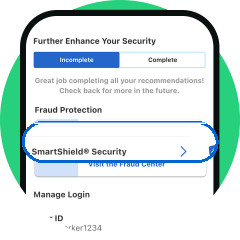
Log in to the Fifth Third Mobile Banking app.
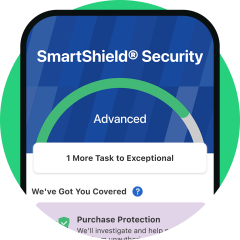
Go to your SmartShield®1 Security dashboard.
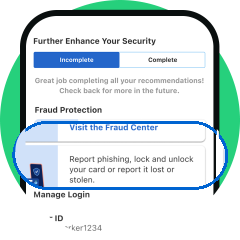
Tap Fraud Center then Report Phishing.
Upload an image of the message and our team will take it from there. Keep staying aware with these 10 Cybersecurity Tips for Digital Banking.
Common Scams to Know
Scammers mimic authority figures or official communications to build trust and create urgency—“hacking” a person’s psyche. Know the different types of scams below so you can protect yourself—and help stop them.
Phishing
When fraudsters impersonate trusted organizations online to trick you into revealing sensitive information.
Example: An email that looks like it’s from Fifth Third, asking you to verify your account by clicking a link that leads to a fake website.

SMiShing
Phishing via SMS (text messages) that usually include urgent language and a link to a fake website or phone number.
Example: A text that says, “Fifth Third Alert: Suspicious activity detected. Click here to secure your account.”

Vishing
Phishing calls that impersonate organizations like your bank or law enforcement to pressure you into sharing information.
Example: A call claiming to be Fifth Third’s fraud department who says your account is compromised and asks for your debit card number.

Quishing
Malicious QR codes in emails or fake ads that lead to fraudulent sites or install malware on your device.
Example: A flyer that says, “Scan to claim your Fifth Third loyalty reward!” with a QR code that directs you to a fake Fifth Third login page.

Social media phishing
Fake promotions, posts or messages on social media using impersonated accounts.
Example: A social media post with Fifth Third branding that says: “🎉 You’ve won a $500 gift card! Click here to claim your prize.”

Pharming
Redirecting you from a real website to a fake one without you knowing, through hacked devices or networks.
Example: You type “www.53.com” into your browser and you're redirected to a fake Fifth Third website.

Spoofing
When a scammer makes it look like they’re contacting you from a trusted source through email, websites or caller ID.
Example: An email that appears to be from alerts@53.com, asking you to confirm a recent transaction.

Search and SEO poisoning
Manipulated search results (including AI-generated summaries) with malicious links and false information that might
imitate a brand website or domain name.
Example: You search “Fifth Third login” and click on a top result that mimics Fifth Third’s homepage.

Protect Yourself from Scams
Red Flags to Watch For
- Requests for private information like account or Social Security numbers
- Spelling errors and unfamiliar links and attachments
- Urgent messages that pressure you to act quickly
- Giveaways or offers that sound too good to be true
In Your Email, Texts and Calls
- If you don’t know the sender, don’t click links or attachments
- Don’t respond to automated calls or messages asking to validate info
- Forward suspicious messages to phishing@53.com
On Social Media
- Only trust verified accounts with a blue check mark
- Watch out for connections with hacked accounts
- Report fake accounts or posts to the platform
On Your Web Browser
- Install computer software and mobile app updates
- Use secure networks and connections (not public Wi-Fi)
- Check for a padlock icon and “https” in the address bar
- Hover on links from search results before clicking to check the URL
- Use bookmarks for sites you frequent
How Fifth Third Helps Protect You
Our Security Never Stops
- 24/7 fraud monitoring to detect suspicious activity
- Secure login technology including biometric authentication
- Real-time alerts for unusual account activity
- Encryption to protect your data during online and mobile banking
- Dedicated fraud team that investigates every report
Preventing Fake Fifth Third Emails
We’re always working to prevent scammers from impersonating us.
- Our authentication protocol called DMARC blocks emails sent from unauthorized sources
- Emails from suspicious or unverified senders are automatically filtered and rejected
Remember to keep your Fifth Third account contact info updated so you receive all important communication.