
Cybersecurity Tips for Employee Identity Theft Protection
For increased identity theft protection, follow these cybersecurity tips to help safeguard employee credentials from theft and fraud.
Key takeaways:
- Corporate identity theft—specifically credential theft—is a growing and costly threat. Stolen employee logins are a leading cause of breaches, costing companies millions.
- Attack methods are diverse and evolving. Phishing, fake search ads, RDP compromise, credential stuffing and weak password stealing remain top tactics.
- Privileged accounts amplify risk. Unauthorized elevated access lets attackers bypass security, install malware, steal sensitive data and disrupt operations.
- Strong cybersecurity hygiene is essential. Use strong passwords and password managers, enable multifactor authentication, apply least privilege and role-based access controls and review access regularly.
- Training and policy enforcement strengthen defenses. Employee security awareness programs, device security policies, timely credential deactivation and digital tools help reduce risk.
Poor employee data protection: an expensive problem facing businesses
For cybercriminals, getting possession of an employee’s computer credentials can deliver a profitable strike to the heart of a company, putting its business systems, applications and sensitive data at risk. Knowing the credentials of employees (especially those with privileged access) can give threat actors an all-access pass to a company’s digital assets. It’s no wonder that theft of employee usernames and passwords is one of the most common root causes of all global cybersecurity incidents, according to IBM’s Cost of a Data Breach Report 2025.
The cost of these cyber intrusions can be significant: More than half of U.S. businesses that suffered a security or data breach reported total losses between $250,000 and $1 million, according to the Identity Theft Resource Center’s 2025 Business Impact Report. Globally, IBM estimates that breaches attributed to compromised credentials cost individual companies an average total of $4.67 million.
These costs are also rising because attacks on credentials are typically difficult to detect and remedy. In fact, cybercrimes attributed to stolen or compromised credentials take an average of 246 days to identify and contain. That gives cybercriminals plenty of time to move across networks to build potentially intrusive and destructive infiltrations.
The consequences of credential theft
Credential theft is often an early salvo in a complex cyberattack. It can be especially dangerous because privileged account credentials, which provide elevated access and permissions, can help diminish cybersecurity across a business’s extended systems and networks. Once inside, criminals can bypass cybersecurity safeguards to install back doors and malware, steal employee and customer data, block user accounts, change access to systems and applications and reset passwords. They can also exploit trusted identities to redirect payments or commit Business Email Compromise (BEC) attacks.
These risks can cause operational disruptions, financial loss, theft of sensitive data, damage to IT assets and costly harm to a company’s reputation and brand.
How do criminals gain access to credentials?
The ways in which cybercriminals can use credentials to access your business systems and steal information and money are multiplying. Here are some of the top threats to be aware of:
- Phishing: Credential theft often begins with phishing scams, which use trickery to get employees to click a link in an email or text. The reason is simple: This type of social engineering scheme is inexpensive, efficient and often successful. In 2025, for example, a large‑scale phishing campaign successfully compromised accounts at several major email-marketing provider companies, including Mailchimp and HubSpot. Attackers used targeted phishing emails to harvest login credentials, allowing them to access internal systems. The incident also created significant future phishing risk by compromising high‑trust email infrastructures.
- Search engine ads: A similar technique that’s on the rise is use of search engine ads that masquerade as brands and send users to credential-stealing sites. Here’s how it works: Threat actors purchase keyword ads that are displayed alongside search results. When users search for specific words or phrases, search engines return fake ads that look very real and link users to malicious sites that steal personal logins and data. These types of ads have been found in business-to-business online banking portals and treasury management platforms.
- Compromise of RDP credentials: Another frequent infection method is the compromise of Remote Desktop Protocol (RDP) credentials. RDP is a Microsoft communications protocol that allows devices to connect remotely. IT administrators often use RDP to establish secure remote connections to help employees solve technical support issues. Nonetheless, cybercriminals can use employee credentials to infiltrate the connection and plant malware into the remote computer.
"The use of RDP for legitimate business can create challenges for defending against RDP attacks without additional controls. Because RDP provides a way for attackers to move laterally across a network and is often enabled for business, it is a frequent target. Fortunately, there are some simple ways to reduce this risk while still using RDP legitimately for your business. Measures like enabling multifactor authentication, strong password policies configuring account lockout and proper network segmentation don't require costly technology but can significantly help defenders," said Stephen Salerno, senior vice president and senior director for the Cyber Threat Program at Fifth Third Bank
- Credential stuffing: This technique remains a go-to attack vector. Cybercriminals capture username and password pairs from compromised websites and services, then use bots to run lists of these credentials to scour login portals for matches to gain access to user accounts. Credential stuffing is effective for a simple reason: Employees mistakenly reuse login information across multiple sites and services. The impact can be significant. Consider, for instance, when Roku was hit by two major credential‑stuffing attacks in early 2024. Attackers used passwords stolen from other breaches to break into user accounts. In total, more than 590,000 accounts were compromised. Roku responded by resetting affected passwords, reimbursing fraudulent charges and enforcing mandatory two‑factor authentication for all users to prevent future attacks.
- Weak passwords: Cybercriminals know that employees continue to use weak passwords because they are easy to remember. A recent study revealed a staggering 94% of passwords are reused or duplicated across multiple accounts, leaving users extremely vulnerable to attacks. Strong passwords serve as the first line of defense against unauthorized access and one of the most effective solutions are automated password managers. These tools automatically generate complex, random passwords that can be synchronized and used across multiple devices to defend against intrusions.
Other ways that threat actors gain access to employee credentials include:
- Purchase of stolen credentials on the dark web, where illicit transactions take place.
- Exploitation of default login usernames and passwords.
- Open ports and misconfigured services that are exposed to the internet.
- Compromise of remote services such as virtual private networks (VPNs).
- Abuse of administrative privileges by company insiders.
How can businesses secure access to systems and files?
The rise of hybrid work and the continued proliferation of cyber breaches have elevated the importance of user access controls. These access controls are a key component of identity and access management (IAM) solutions and should be reviewed and updated regularly. Controls should be developed that grant employees access only to digital assets required to perform their jobs, a restriction known as the principle of least privilege access.
Businesses can augment IAM capabilities with what’s known as role-based access control (RBAC), which grants authorization based on a particular employee role. These role-based controls deliver access control and enforcement based on a dynamic risk assessment that parses user behavior and contextual data analytics to determine risks. RBAC also encompasses processes for the hiring, separation and internal transfer of employee credentials.
Other best cybersecurity practices include:
- Separation of administrator and user accounts to protect privileged credentials.
- Periodic reviews of employee access settings.
- Monitoring of leaked credentials on the dark web.
How can midsize businesses secure credentials?
Cybercriminals often target small and midsize businesses because they often lack an in-house cybersecurity team or technical experts. Nonetheless, there are plenty of non-technical workplace security tips that can help protect employee credentials.
Among the most effective is security awareness training for employees. Workers should understand how to spot potential phishing scams as well as have knowledge of basic cybersecurity hygiene. Also essential: up-to-date training for IT and cybersecurity staff, as well as having trusted third parties with access to your systems and network.
It’s also critical to create and enforce policies mandating strong passwords for employees. Businesses also should change the default admin login credentials when deploying new hardware and software. There should be a system in place to inactivate credentials of employees leaving the firm.
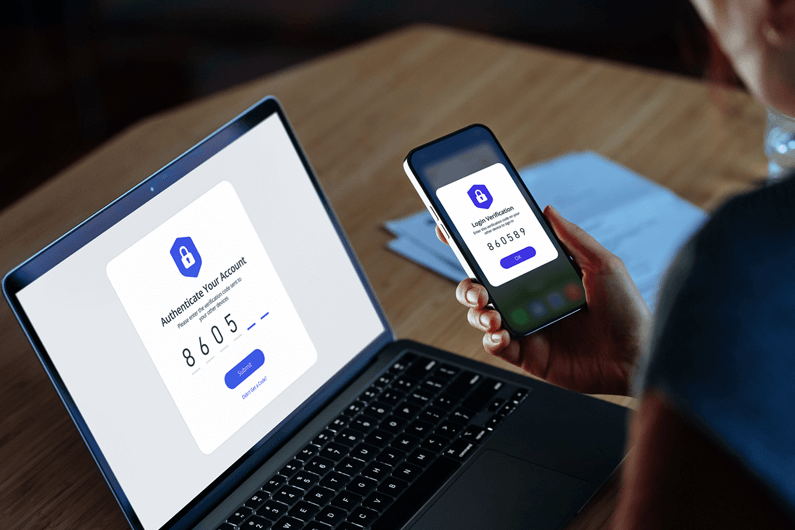
In addition, several common technology safeguards can help protect credentials. Multifactor authentication, which typically sends a code to a smartphone, is key to shielding information, particularly for remote workers. Antivirus solutions can help detect and remove malware, while a web application firewall can help identify suspicious login attempts and botnet activity.
Other best practices include:
Giving employees access only to the data, applications and systems they need to perform their job.
Developing policies for securing employee devices.
- Keeping operating systems, software and devices up to date.
- Using a firewall and VPN to mask your IP address and encrypt data.
- Limiting the number of authentication attempts and freezing accounts after repeated failed login requests.
If companies follow these basic cybersafety precautions, they can greatly reduce the chances of employee credentials being compromised and avoid the expensive and painful effort needed to remove cyber villains from their systems. Most of these are easy to implement but need to be repeated frequently to keep employees vigilant.
To learn more about how Fifth Third can help strengthen your organization’s cybersecurity, visit additional resources or contact a Fifth Third relationship manager.